Give your AI agent a machine, not another dashboard
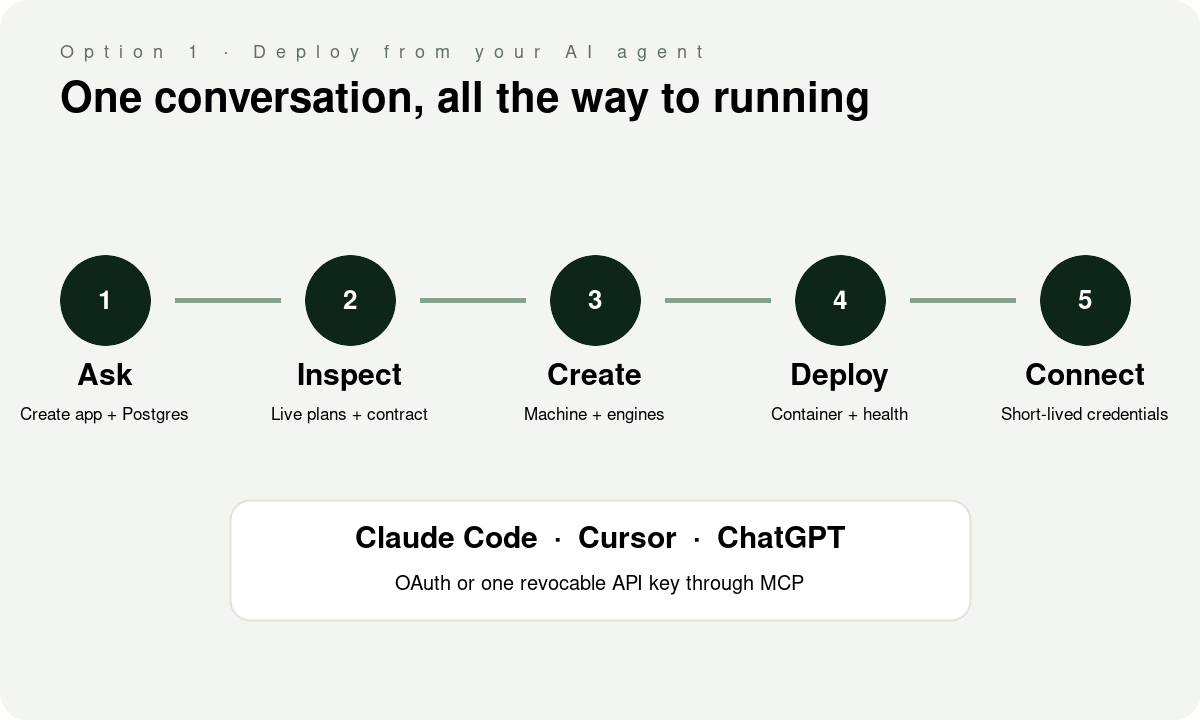
A coding agent can write the application. It should also be able to create the place where the application runs, turn on Postgres, deploy the container and hand the app the right connection string.
Lathe exposes the same account through the portal, REST API and a remote MCP server at https://mcp.lathe.live. Connect it once, then Claude Code, Cursor or ChatGPT can inspect the live contract and do the infrastructure work in the same conversation as the code.
This guide uses the current production endpoint. An API key acts as you across the account, so give it only to an agent you would trust with the portal. OAuth is safer where the client supports it because you can disconnect that client separately.
Claude Code
Claude Code can sign in with OAuth. Run:
claude mcp add --transport http lathe https://mcp.lathe.live
Then open /mcp in Claude Code and finish the browser sign-in. If you prefer a static key from the Lathe Access page:
claude mcp add --transport http lathe https://mcp.lathe.live --header "Authorization: Bearer lathe_…"
Cursor
Create .cursor/mcp.json in the project for a project-scoped connection, or use Cursor's global MCP settings:
{"mcpServers":{"lathe":{"url":"https://mcp.lathe.live","headers":{"Authorization":"Bearer lathe_…"}}}}
Keep the real key out of Git. A user-level config or an environment-variable substitution is better than committing it to the repository.
ChatGPT
In ChatGPT web, open Settings, then Apps and Connectors, Advanced settings, and turn on Developer mode. Create an app for a remote MCP server, name it Lathe, enter https://mcp.lathe.live, and use OAuth. ChatGPT will send you to Lathe to sign in and approve the connection.
OpenAI's developer-mode documentation says write tools require confirmation by default. Keep that on. Creating or deleting infrastructure should never look like a read.
What to ask the agent
Start by making it read the live contract instead of guessing from this article:
- "Use Lathe's
list_planstool and show me the current plans, regions and engine memory minimums." - "Use
app_guideto check the container contract for this deployment." - "Create a Mini instance with Apps, Postgres and Auth, then give me the checkout or trial link."
- "Add this repository as an app, set the health path and deploy the current image."
- "Create a Postgres database for the app and issue short-lived connection credentials."
A paid instance is never silently purchased by the agent. The tool returns a checkout URL for a person to open. A new account can start one Mini trial for 14 days with no card.
The useful end state
The agent can get from a repository to:
- a running machine with the engines the project needs;
- an app deployment with its health path and domain;
- a Postgres database owned by a normal role;
- temporary connection credentials or the standard connection string;
- job status, logs and a clean failure if provisioning or deployment did not finish.
The same controls apply as in the portal. Destructive tools require the instance id as confirmation. Connection access can be time-bounded and revoked. The agent does not receive a special back door.
What this is not
An MCP connection does not make an agent infallible. It gives the agent current tools and current facts. Review the plan, region and engines before opening checkout. Keep production deletion confirmations enabled. Disconnect a client or revoke its key when the work is done.
The payoff is smaller than "autonomous DevOps" and more useful: the agent that changed the code can also read the actual deployment contract, make the matching infrastructure change and report the job that proves it happened.